Adsense Me Ads Unit kaise Banaye
If your Adsense Account has been approved, then now you have to create Ads in Adsense, after that you will have to insert Ads in your blog, then in this post we will tell you about creating Ads.

Adsense is a service of Google itself. People now earn lakhs of rupees in it. If your Adsense Approve has been done, then you too can earn money from it.
Friends and let me tell you in one thing that Google company earns the most from its Adsense Service. If millions of companies advertise themselves in Adsense, then they pay Adsense as much as companies, Adsense pays only a few percent of that to their publisher.
Now I am telling you some simple steps that you can create ads by following them.
Step 1: First you login to your Adsense Account.
1. Now click on My Ads
2. Now click on New Ad Unit

Step 2: Now a new page will open here.
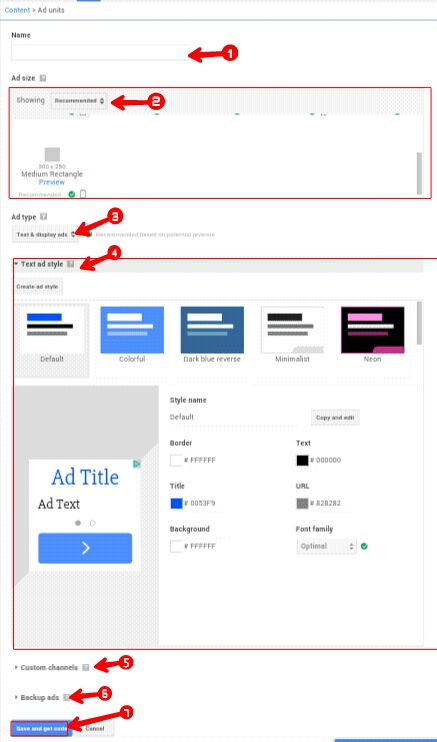
1. Write the type or size of Ad you are making in the title.
2. Here is to select Ad Size. First you select Recommend above then choose your size below.
3. Select Ad type here. I will ask you to select Text and Display Ads, but if you want to show only Text Ads, then select Text Ads.
4. Let the default remain in Text and Style as they become Automatic Customize according to your site.
5. If you want, you can manage ads according to the channel, create a channel for this or leave it.
6. Leave Backup Ad.
7. Now click on Save and Get code.
You will be a Popup Page Open, it will have some codes and copy them. And past it in your blog. If you do not know how to install Ads code in your blog, then in the next post we will tell you about it.
Comments
Post a Comment